
Cut Planner — Cutting bars, pipes and profiles with minimal waste
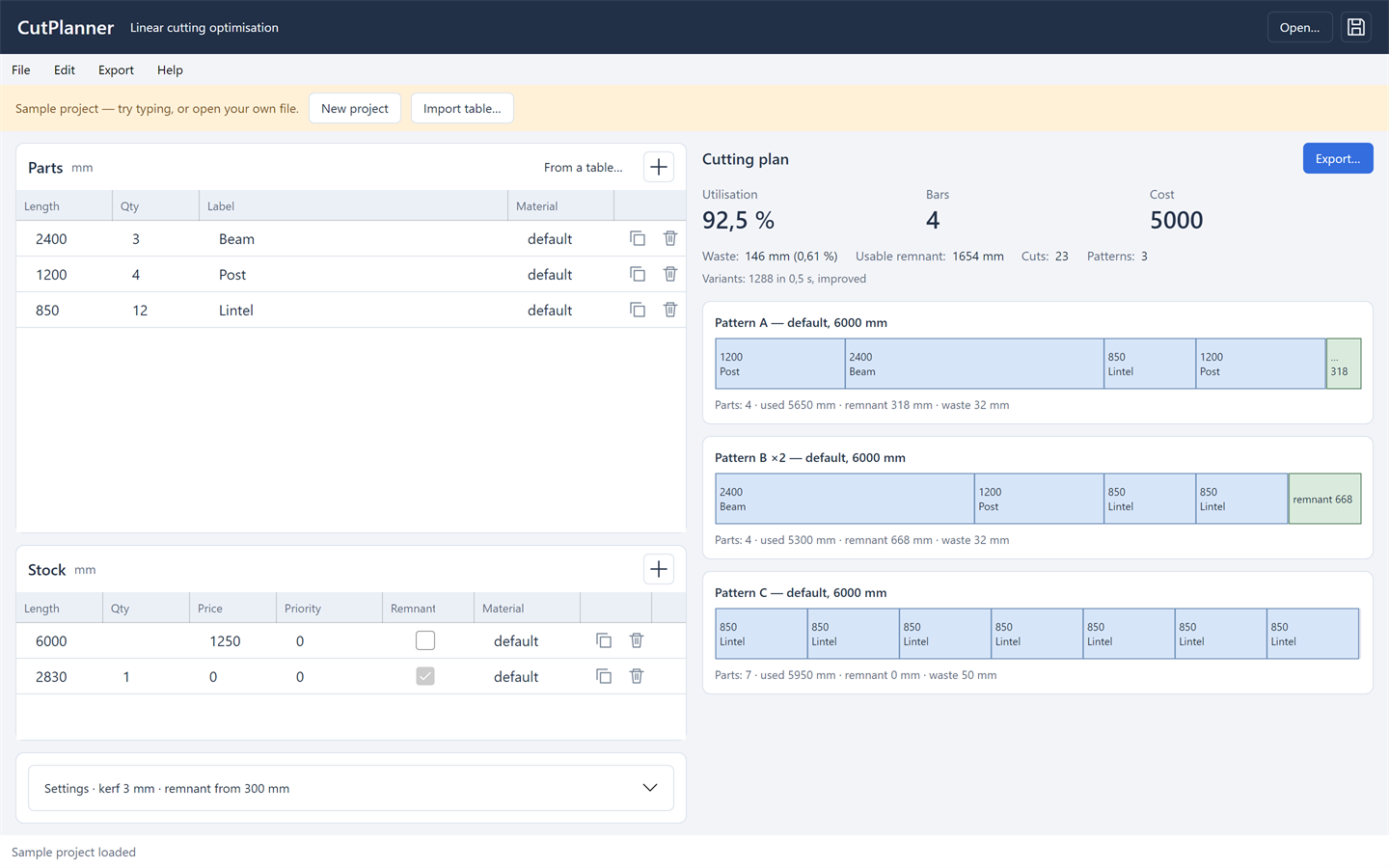
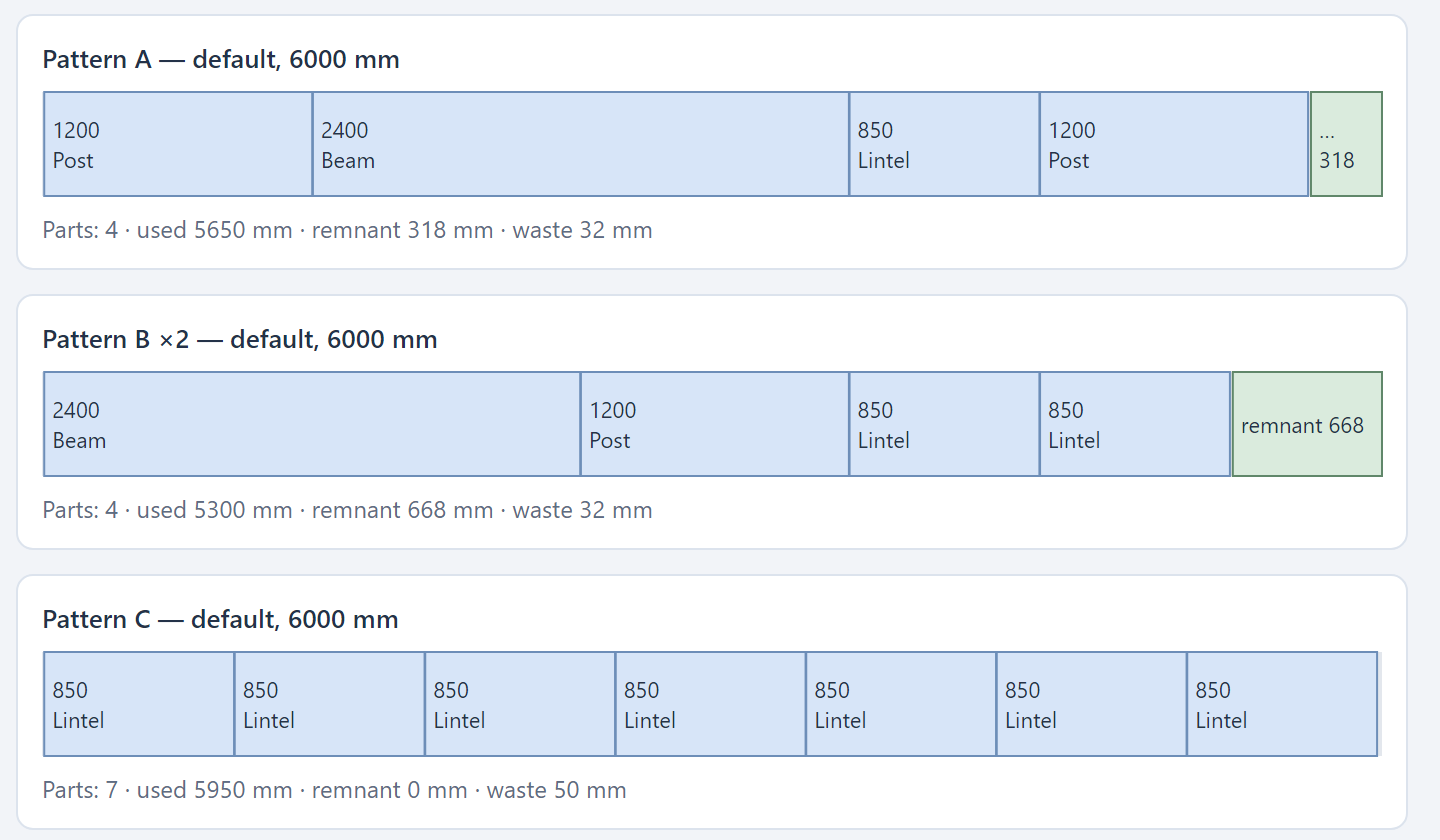
Lays out cut pieces on stock lengths, taking into account the saw kerf, end trimming and the minimum usable offcut. The plan is recalculated as you type: parts and stock on the left, totals and to-scale cutting maps on the right.
Windows and Linux, 64-bit. Free for individuals and for organisations with up to 100 employees, commercial use included.
The program has an English interface since version 1.2.0: choose it in Help → Language.
Features
Calculation
- Saw kerf, left and right end trimming, minimum usable offcut.
- Limited and unlimited stock, priorities, price.
- Grouping by material, with parameters inherited from project to material.
- Six strategies: least waste, fewest offcuts, fewest stock lengths, fewest cuts, lowest cost, fewest unique patterns.
Plan quality
- A speed ↔ quality setting: from a single pass to 15 seconds of searching for variants.
- Two ways of filling a stock length are calculated, and the better result goes into the plan.
- At the «Thorough» and «Maximum» levels the program solves the problem exactly by Gilmore–Gomory column generation with Ryan–Foster branching. A proven optimum is marked in the results.
- The calculation runs in the background and stops when the input changes.
Input and output
- Input parsing: «1200x4», «1200 4 pcs», «1.2 m», «47 1/2"», «2400 Beam».
- Pasting tables from Excel with Ctrl+V.
- CSV, TSV and XLSX import with a wizard: sheet, header row, units, column detection.
- Export: PDF with maps and a cut list, a six-sheet Excel workbook, CSV.
- The cut list is copied to the clipboard with tabs and pastes into a range of Excel cells.
Everyday work
- Automatic recalculation 300 ms after an edit; no separate «calculate» command.
- Row buttons duplicate and delete a part or stock item; Ctrl+Z undoes a deletion.
- Export is available once the plan is recalculated, so an outdated plan is never exported.
- Light and dark theme following the Windows setting.
- The current project is restored after a restart.
- The .cutplan project file is readable JSON with a schema version.
- Input diagnostics: a part longer than the stock, stock running out, zero kerf, a table row left out of the calculation.
What's new
Version 1.2.1 · 9 November 2026
- The sample project no longer overwrites the previously opened file: saving it asks for a path, like a new project.
- XLSX import reads tables whose data does not start at the first column.
- Fractional lengths in CSV and on the clipboard follow the Windows language, so Excel reads them as numbers.
- Interface failures show up in the status line instead of failing silently.
Version 1.2.0 · 29 October 2026
- English interface: choose the language in Help → Language and the program remembers it; on the first start it follows the language of Windows.
- Documents follow the interface language: cutting diagrams in PDF, Excel workbooks and the CSV cut list.
Version 1.1.2 · 28 October 2026
- Questions, comments and suggestions go to a private chat with the support bot — in Telegram or MAX, whichever you prefer; the operator replies in the same chat.
- The help window has a button for each messenger, and the request is tagged with the program automatically.
Version 1.1.1 · 18 October 2026
- New main window: the cutting plan with totals on the right, parts and stock on the left, calculation settings folded into a single line.
- Row buttons duplicate and delete a row; Ctrl+Z or the button at the bottom of the window brings a deleted row back.
- The plus in a table header adds a row and opens the length for editing right away.
- Light and dark theme following the Windows setting.
- Improved reliability and stability; updated program components.
Version 1.1.0 · 11 October 2026
- The program checks for new versions itself; Help → Check for updates downloads them, verifies the signature and installs them.
- The help now has a «Data and internet» section: what the program sends to the site, and when.
Version 1.0.1 · 22 September 2026
- Table rows left out of the calculation are listed in the diagnostics with the row number and the reason.
- Improved accuracy of the cutting plan and its cost.
Version 1.0.0 · 27 July 2026
- First release.
Terms of use of Cut Planner
Free and perpetual for individuals, for any purpose including professional work. Free and perpetual for organisations and sole proprietors with up to 100 employees, commercial use included. No registration, payment or notice to the copyright holder is required. Larger organisations need a separate paid licence and have 30 days of free use to arrange it. Cutting plans, reports and exports made in the program belong to the user, with no restrictions or royalties.
This is a summary. The legally binding document is the
licence agreement in Russian; the same file ships in the
archive as LICENSE.md and opens from the program's help. An English translation
is provided for reference.
System requirements
Windows
Windows 10 version 1809 or later, or Windows 11, x64. The build with bundled .NET needs no additional components.
Linux
A 64-bit distribution with a desktop environment; tested on Ubuntu 24.04 LTS. Requires the system libraries libicu, libX11, libICE, libSM, fontconfig and the DejaVu fonts; most distributions have them installed.
Files and settings
Projects are saved to .cutplan files — readable JSON with a schema version.
Settings and the current session are kept in
%APPDATA%\CutPlanner on Windows
and ~/.config/CutPlanner on Linux.
Support
The built-in help opens with F1: how the calculation works, file formats, keyboard shortcuts and system details for a support request. Bug reports and suggestions are welcome in support — in a chat with the bot.
Software for your processes
Cut Planner was developed for a client's production task. We build similar solutions to order: specification, architecture, development, rollout and support. A working prototype in as little as one week.